Family Document Binder vs. an App: What Actually Holds Up
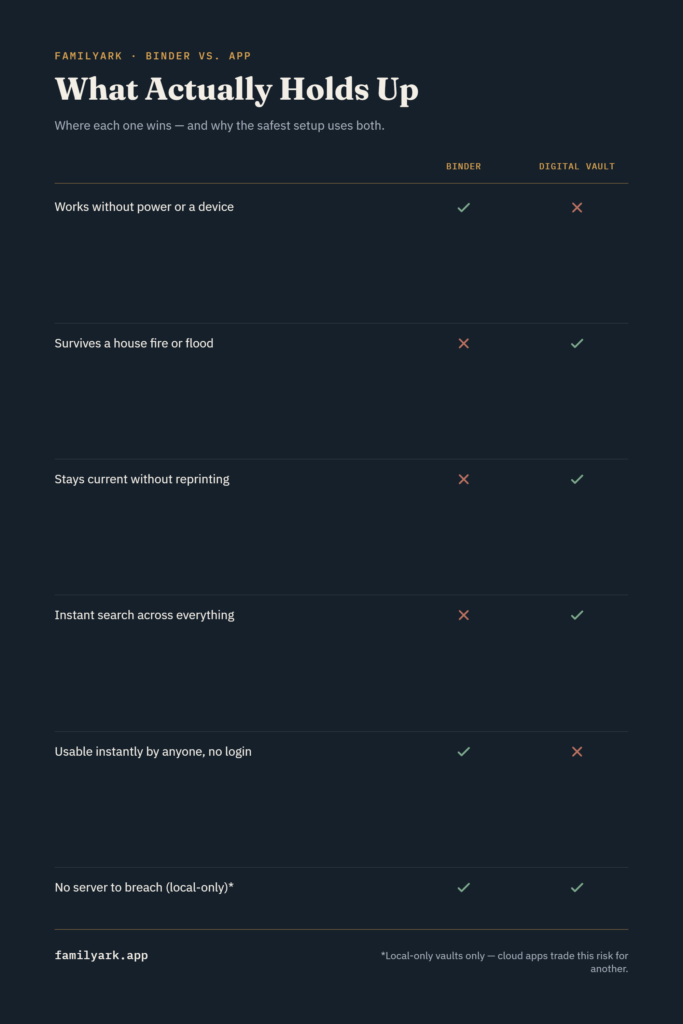
Neither a paper binder nor a digital app is the complete answer on its own — a paper binder can burn, flood, or get stolen, and a phone or laptop can be lost, dropped, or become the one device your family doesn’t know how to unlock. The setup that actually holds up combines both: an encrypted digital record as your durable, always-current copy, plus a small physical grab-and-go set for the moments when you need something in hand, fast, without a screen. Here’s how each one actually performs, and where they fail.
The case for a physical binder
Paper has a few real advantages that don’t show up on a features list:
- No dependency on power, a device, or a password you might forget under stress. A binder works during a blackout, a dead phone battery, or when you’re not the one holding it.
- First responders and unfamiliar helpers can use it immediately. A paramedic, a neighbor, or a hotel front desk during an evacuation doesn’t need an app walkthrough.
- Zero technical failure points. No software updates, no account lockouts, no “which cloud did I put this in.”
Where paper actually fails
This is the part most binder advocates undersell. According to the National Fire Protection Association, U.S. homes experience an average of roughly 358,500 structure fires every year — and a binder kept in a home office or a kitchen drawer is exactly as vulnerable to that fire as everything else in the house. Flooding, a burst pipe, or a basement storage area problem does the same damage without any fire involved.
There’s a second failure mode that’s less dramatic but more common: a binder is only accurate the day you finish it. Reviewing outside research on family emergency binders turns up the same warning repeatedly — keeping physical copies current “is difficult, which means it often does not happen.” An account you closed two years ago, a policy that renewed under different terms, a password that’s since changed — paper doesn’t update itself, and re-printing pages is enough friction that most people simply stop.
And a binder is also a single physical object: whoever doesn’t have access to it (a family member in another city, someone traveling when an emergency hits at home) has no copy at all, unless you’ve separately made and distributed duplicates.
The case for a digital app or vault
A well-built digital vault solves the two problems above directly: it can be updated in minutes instead of requiring a reprint, and it isn’t tied to one physical location that a single fire or flood can take out entirely. Search also matters more than people expect — finding “the insurance policy number” is a search bar away instead of flipping through tabs.
The important distinction inside “digital,” though, is where that data actually lives. A cloud-based app puts your most sensitive information — Social Security numbers, account details, medical history — on a company’s servers, which introduces a different kind of single point of failure: a data breach, a company shutting down, or a subscription lapsing and cutting off access. A local-only encrypted vault avoids that specific risk because nothing ever leaves your device, but it introduces its own requirement: you need a real plan for how a trusted family member gets in if something happens to you, since there’s no “forgot password” email reset waiting on a server somewhere.
This is the gap FamilyArk was built for on the digital side of this comparison — local-only, AES-256 encrypted, with a PIN-protected profile per family member and nothing stored on a server. It solves the update problem and the “which cloud” problem, without introducing a hosted account as a new point of failure.
What actually holds up: the hybrid FEMA and the Red Cross recommend
This isn’t just a compromise position — it’s the specific structure both FEMA and the American Red Cross recommend for household emergency preparedness: original documents in a fireproof, waterproof safe; printed copies of the essentials in a portable, grab-and-go binder; and a digital backup that isn’t tied to the same physical location as the originals.
Applied to a real family, that looks like:
- Originals (birth certificates, the will, property deeds) in a fireproof/waterproof home safe — not the binder itself.
- A slim grab-and-go binder with photocopies of the essentials (IDs, insurance cards, an emergency contact sheet) that you could genuinely grab in 60 seconds during an evacuation.
- A digital vault as the complete, current, searchable version of everything — the one place a family member could rebuild the whole picture from, even if the safe and the binder were both lost.
None of the three replaces the other two. The binder is fast; the safe protects originals; the digital vault is the one that stays current and survives a fire that takes out the other two entirely.
A simple weekend plan
- Pick your digital vault and build out the full document checklist inside it — this becomes your source of truth.
- Print the essentials only — IDs, insurance cards, an emergency contact list — into a slim binder kept somewhere you’d actually grab it.
- Put true originals in a fireproof safe, separate from the grab-and-go binder.
- Tell one trusted person where all three live and how to access the digital vault if needed.
- Set a twice-yearly reminder to update the digital vault and reprint anything that’s changed in the binder.
Frequently asked questions
Isn’t a binder simpler to just set up once and forget? It’s simpler to start, but “set and forget” is exactly what makes it unreliable years later — the information going stale is the most common real-world failure, not the binder itself getting damaged.
Do I really need a fireproof safe if I have a digital backup? Yes, for original documents specifically — some institutions require an original (not a copy) for things like a birth certificate or a vehicle title, and a digital scan doesn’t substitute for that in every situation.
What if I only have time to do one of the three? Start with the digital vault. It’s the one piece that’s both hardest to destroy in a single event and the only one that stays useful if it’s the only thing that survives.
Is a cloud-based app safer than paper? Safer from fire and flood, yes — but it trades a physical risk for a different one (data breaches, account access, company reliability). A local-only encrypted option avoids that specific trade-off, which is worth knowing when you’re comparing digital options against each other, not just digital versus paper.