Where to Store Passwords You’d Never Want Emailed to Anyone
The safest place for a password is a dedicated password manager or an encrypted local vault — never email, a text file, or a spreadsheet. That sounds obvious written out, but roughly 1 in 5 people currently keep at least some passwords sitting in their email, and once you understand why that’s risky, the better options are quick to set up.
Why this matters more than it feels like it should
Password reuse is the real multiplier here. Research consistently finds that a large majority of people — estimates range from 62% to 84% depending on the survey — reuse the same password or a close variation across multiple accounts. That means one exposed password rarely stays contained to one account; it’s often the key to several.
Here’s how people actually store passwords today, based on recent survey data:
- Memorized only: 41–55%
- Written on paper: 30–32%
- Saved in a browser: 27%
- Documented in a file on the computer: 23–25%
- Stored in email: 20%
- Dedicated password manager: 30–34%
Several of these overlap — most people use more than one method for different accounts — but the pattern is clear: a large share of passwords are sitting somewhere far less protected than people realize.
Why email specifically is a bad place for a password
This is worth calling out on its own, since it’s such a common habit — sending yourself a password as a reminder, or emailing one to a family member “just this once.”
- It sits there indefinitely. A password sent by email stays in your sent folder and the recipient’s inbox until someone actively deletes it — often for years.
- It travels across multiple servers in transit, any of which is a point where it could theoretically be intercepted or logged.
- You lose control the moment you hit send. You can’t recall it, and you have no way of knowing if the recipient forwards it, screenshots it, or leaves it sitting in an inbox that later gets compromised.
- Anyone who gains access to either inbox — through hacking, phishing, or just picking up an unlocked phone — can read it in plain text, no additional effort required.
A spreadsheet or plain text file on your computer has a version of the same problem: no encryption, easy to search, and often synced to cloud storage without you thinking of it as “storing passwords in the cloud” — but that’s exactly what it is.
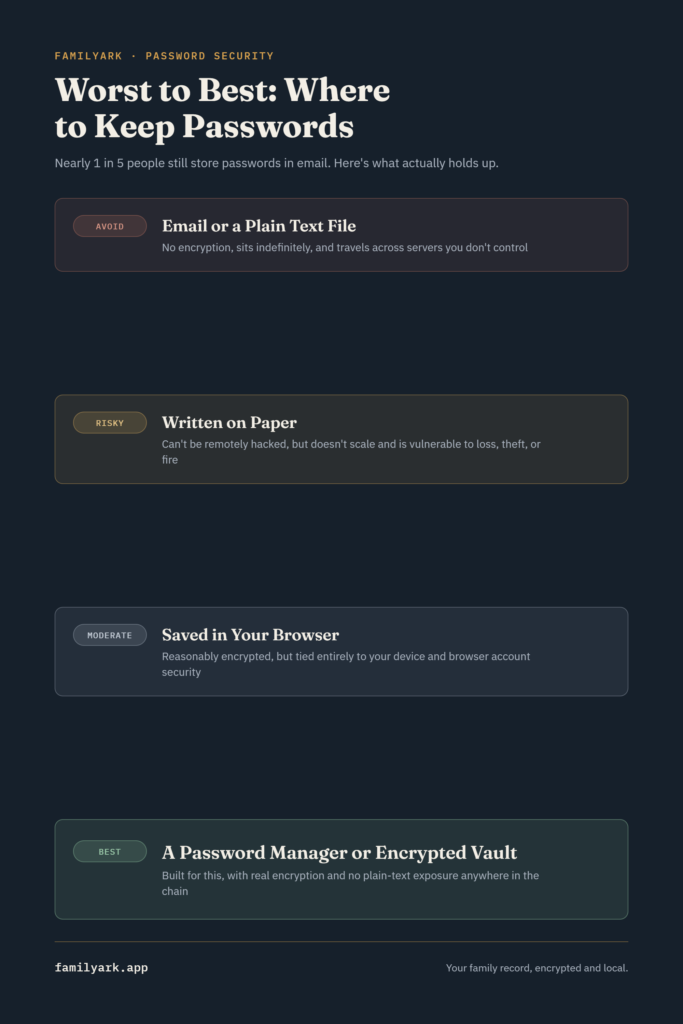
Ranking the common methods of where to store passwords, worst to best
Email or a plain text file — avoid entirely. No encryption, indefinite exposure, and often synced or backed up somewhere you’re not tracking.
Written on paper — better than it sounds, with real limits. A password on paper can’t be remotely hacked, which oddly makes it safer than a lot of digital habits. But it doesn’t scale past a handful of accounts, can’t autofill anything, and is vulnerable to simple loss, theft, or a house fire — the same physical risks covered in the case for pairing paper with a digital backup.
Saved in your browser — convenient, moderately risky. Modern browsers encrypt saved passwords reasonably well, but they’re only as secure as your device and your browser account. If your laptop is compromised or your browser sync account is breached, everything saved there is exposed at once.
A dedicated password manager or encrypted vault — the actual answer. Built specifically for this, with real encryption, unique-password generation, and no plain-text exposure anywhere in the chain.
The distinction that actually matters: daily logins vs. the family record
There’s a nuance here worth being specific about, because these solve two different problems:
A password manager (1Password, Bitwarden, and similar) is built for your own daily use — autofilling logins across dozens of accounts, generating strong unique passwords, and syncing across your own devices. It’s the right tool for the accounts only you use.
A family emergency record is a different thing entirely: a documented list of accounts, institutions, and access details that a trusted family member could use if something happened to you — not for daily logins, but for the handful of times a family genuinely needs to get into something on someone else’s behalf. This is closer to the digital inventory covered in digital estate planning than to a password manager, and it’s the piece most families skip entirely, because “just email it to them” feels like the fast option in the moment.
This is the specific gap FamilyArk is built to fill — a local-only, encrypted place to keep that family-facing record (accounts, access notes, instructions) without it ever touching email, a shared spreadsheet, or a cloud server. It’s not a replacement for your personal password manager; it’s the piece that sits alongside it for the information your family would need, not just you.
A simple weekend plan
- Get a dedicated password manager for your own daily accounts if you don’t already use one, and let it generate unique passwords going forward.
- Search your email for the word “password” and see what turns up — most people are surprised. Move anything you find into your password manager, then delete the emails.
- Check your computer for a passwords file or spreadsheet and do the same — move it in, then securely delete the original rather than just dragging it to the trash.
- Separately, build the family record — the accounts and access notes a trusted person would actually need, stored somewhere encrypted and outside your day-to-day password manager.
- Tell one person that record exists and how they’d get into it if they ever needed to.
Frequently asked questions
Is it ever okay to text a password instead of emailing it? It carries most of the same risks — indefinite storage on both ends, no encryption in most messaging apps, and no way to revoke access once sent. A password manager’s built-in sharing feature (most offer encrypted, time-limited sharing links) is the safer option when you genuinely need to share one.
What should I do with old passwords sitting in old emails? Change the password for that account if you haven’t recently, then delete the email. If the account is one you no longer use, close it instead.
Do I need both a password manager and a family vault? For most families, yes — they serve different purposes. A password manager handles your own daily logins; a family vault handles the “if something happens to me” record that a family member would need, which most password managers aren’t designed around.
Are browser-saved passwords really that risky? They’re better than nothing, but they’re tied entirely to your device and browser account security. If you’re already going to set something up, a dedicated password manager gives you meaningfully better protection for roughly the same effort.